


GPS Emulator
4.83.39K Reviews
App Specs
- Version
- 3.30
- Updated On
- License
- Free
- Downloads
- 10,000,000+
- Developer
- Digitools UY
- Categories
- Maps & Navigation
- Platform
- Android
Screenshots
 Analysis by AppCompare
I see GPS Emulator as a focused tool for changing the location a phone reports, rather than a replacement for navigation. That distinction matters: it can be useful when you need a location-based app to test a different place, but it is not designed to help you find your way around town. Its appeal is the directness of that idea, while its limits come from the fact that other apps and services may not accept a simulated location.
A location tool, not a travel guide
GPS Emulator is a free Android app from Digitools UY in the maps and navigation space. It has a 4.8 average from around 253,000 ratings, and it has passed 10 million installs. Those figures suggest plenty of people have found a reason to try it, though popularity alone cannot tell you whether it fits your particular use. The app is rated Teen, and its current version is 3.16.
The key question is what you expect “navigation” to mean. A regular map app uses your current position to help you orient yourself and travel. This one changes the position your phone reports. That makes it more relevant to testing, location-based entertainment, and demonstrations than to directions. If your goal is simply to get from one place to another, a conventional navigation app is the better choice.
Where it can be genuinely useful
I find the most convincing use case is checking how a location-aware app behaves in a place you cannot conveniently visit. A developer or tester could use a simulated position to inspect whether an app responds to a different area, while someone demonstrating location-based features could show the change without making a real trip. It can also be useful for exploring an app’s location-dependent interface, provided that app permits simulated locations.
There is a practical distinction between looking at a map and testing a full service. Moving the phone’s reported coordinates may change what a location-aware app displays, but it does not guarantee that every feature will work. Some services may use other checks, update location on their own schedule, or restrict simulated positioning. I would treat this as a way to test a location input, not as a promise that an outside app will behave exactly as if you were physically there.
A realistic example: imagine you are preparing a short demonstration of a local discovery app for a colleague. Rather than travelling across town just to show how its nearby results change, you can set a different map position and see whether the app’s display responds. I would compare the result with the real-world view before drawing conclusions, because the emulator changes the location signal, not the underlying businesses, opening hours, or service availability.
Choosing a position with a little care
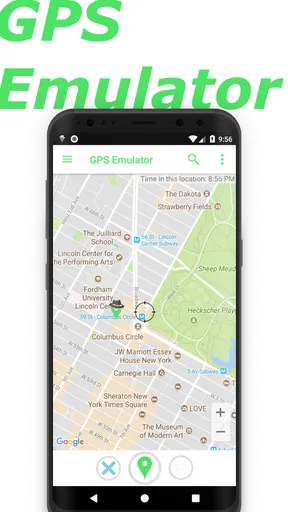
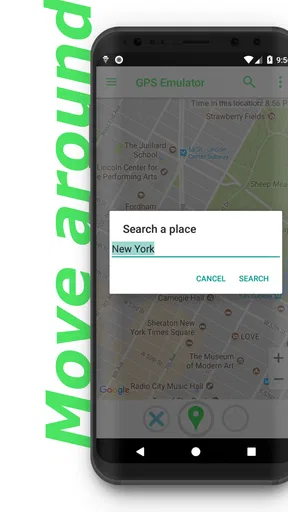
The map-based setup is approachable, but it is worth being deliberate about where you place the marker. For testing, choose a recognizable area rather than dropping it near a boundary or in an indistinct patch. That makes it easier to tell whether a location-aware app has reacted as expected. If the app you are testing shows a different result than you anticipated, first check that it has had time to refresh before changing the emulator again; changing several things at once makes the outcome harder to interpret.
Worth Reading Before You Choose

EA SPORTS FC Mobile 26 Is a Bigger Football Game, but It Takes Time

Flipboard Shows What News Apps Must Do Beyond the Feed

Switching to Android Auto Means Rethinking Your Driving Routine

Google Calendar Makes a Crowded Week Easier to Manage

Ludo King Makes the Most of the Minutes Between Plans

Baby Panda World Brings Quick Play to Modern Phones, but Its Game Library Feels Busy
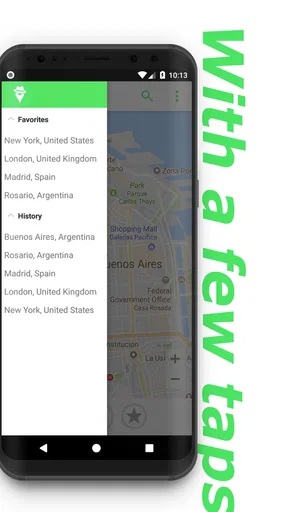
Saved favorite locations are useful when you revisit the same test areas. Instead of searching the map from scratch each time, you can keep a small set of places that represent different scenarios—for example, a dense urban area and a less central one. This is more useful than collecting a long list of random pins: a few consistent test locations make comparisons clearer and reduce setup time.
The movement simulation has a different purpose from simply selecting a point. A fixed location can help check what an app shows around one place; a simulated route can help you observe whether it responds as the reported position changes. I would use a short, simple path for that kind of check and watch the target app’s behavior as it updates. A complicated route can make it difficult to tell whether a change came from movement, delayed refreshes, or the app’s own logic.
What it does not replace
GPS Emulator should not be confused with a privacy switch or a complete way to hide where you are. Changing a GPS position is not the same as removing every possible clue about your actual location, and it cannot make other apps ignore their own rules. If you are considering it for privacy, think carefully about what information the specific app collects and what its settings allow. I would not rely on a changed map position as a guarantee of anonymity.
It is also not the right tool for manipulating a service in ways that break its terms or affect other people. Location-based games and apps may prohibit simulated movement, and using it can put an account or activity at risk. I would check the rules before trying it with a game, and keep experiments to legitimate testing or personal exploration. That is a more sensible boundary than assuming that a technically possible change is automatically permitted.
Compared with ordinary navigation apps, the trade-off is clear: those apps are built to help you travel using your real position, while this one is about supplying a different position to the phone. Compared with a developer’s dedicated testing setup, it is a simpler option for quick manual checks, but it should not stand in for a thorough test of every device, location condition, or service response. Its strength is convenience, not exhaustive verification.
Good fit, with a few reasons to pass
I would recommend it to curious users who understand the difference between simulated and physical location, and to people who need a straightforward way to explore how an app responds to another position. It is especially appealing if you revisit the same locations or want to observe a route rather than only set a single point. The saved-place and movement options give those users more to work with than a one-off coordinate change.
I would skip it if you only need reliable directions, want a dependable way to conceal your whereabouts, or expect every location-based game and service to accept a changed position. It is also a poor fit if you need a controlled testing environment with extensive diagnostics: this app’s straightforward approach is not a substitute for a broader testing workflow. In those cases, use a standard navigation app for travel or the specific testing tools recommended for the service you are evaluating.
The app is free to install, with in-app purchases ranging from $1.49 to $199.99 per item. I would check the purchase details in the app before spending anything and decide whether the basic location-changing workflow meets your needs first. The wide range makes it sensible to avoid assuming that every useful option is included at no cost.
What is GPS Emulator?
Okay, so let's break it down. GPS Emulator is an app that lets you spoof your location. Essentially, you can make your phone think you're sipping coffee in Paris while you're actually in your pajamas at home. Sounds cool, right? It's available on both Android and iOS, making it super accessible for anyone wanting to give it a whirl.
Setting Up the App
Getting started with the app is a breeze. Once you download it, you’ll be greeted with a user-friendly interface that’s straightforward and intuitive. You simply choose a location on the map, and voilà, your phone believes you've teleported. There's something oddly satisfying about watching the little blue dot move to wherever you desire.
Features That Stand Out
Now, onto the juicy bits. The app offers a variety of features that make it more than just a basic location spoofer. You can save your favorite locations, which is great if you frequently need to revisit certain spots. Plus, there's a real-time simulation mode that mimics movement along a predetermined path. It's almost like you're taking a virtual stroll!
- Easy-to-use interface
- Ability to save favorite locations
- Real-time movement simulation
Why Would You Use It?
So, you might be wondering, "Why would I even need this?" Well, there are plenty of reasons! Some people use it to access location-based games or apps that require you to be in a specific area. Others might use it for privacy reasons or just to have a bit of fun with friends. Just remember, while it's fun to trick your phone, always play fair and respect the rules of any app or game you're using.
Performance and Reliability
In terms of performance, the app is pretty solid. I didn’t experience any major hiccups or crashes, which is always a plus. The location accuracy was decent, and it didn’t drain my battery like some other GPS apps tend to do. It's reliable, and that’s exactly what you want from an app like this.
My Personal Take
Honestly, I had a blast playing around with GPS Emulator. It’s one of those apps you didn’t know you needed until you tried it. It's fun, easy to use, and serves its purpose beautifully. Whether you're a gamer trying to catch them all or someone who just wants to prank a friend, this app has got you covered.
Remember, though, while it’s fun to play around with your location, always be mindful of how you use it. Stay safe and enjoy the adventure of being virtually anywhere in the world!
Pros
- User-friendly interface with intuitive controls.
- Wide range of location customization options.
- Supports multiple GPS formats for flexibility.
- Lightweight app with minimal battery usage.
- Frequent updates ensure improved functionality.
Cons
- May not work with all apps needing GPS.
- Some features require in-app purchases.
- Occasional minor bugs affecting performance.
- Limited customer support response time.
- Requires manual setup for optimal accuracy.
FAQs for GPS Emulator
What is GPS Emulator and how does it work?
GPS Emulator is an app that allows users to simulate GPS locations on their devices. It works by overriding the real GPS data with user-defined coordinates. This can be useful for testing apps, playing location-based games, or accessing geo-restricted content. The app provides a straightforward interface for selecting and setting locations.
Is GPS Emulator safe to use on my device?
Yes, GPS Emulator is generally safe to use as long as it is downloaded from a reputable source like the Google Play Store or Apple App Store. It doesn’t require root access, which minimizes security risks. However, users should be cautious when granting permissions and ensure they understand the privacy implications.
Can GPS Emulator be used for gaming purposes?
Yes, many users employ GPS Emulator for gaming, especially with location-based games such as Pokémon GO. It allows players to "travel" to different locations without physically being there. However, it's important to note that using location spoofing in games may violate terms of service and could lead to account bans.
Does GPS Emulator affect my device’s performance?
GPS Emulator is designed to be lightweight and should not significantly impact your device's performance. It runs in the background and uses minimal resources. However, users with older devices may experience slight slowdowns if multiple apps are running simultaneously.
Are there any legal concerns with using GPS Emulator?
While using GPS Emulator is legal, users should be aware of potential legal and ethical concerns, particularly regarding location-based games and services. Spoofing your location can violate terms of service, and users should ensure they comply with all applicable laws and agreements when using the app.


